
Characters
Character Consistency Guide
Learn how to keep AI-generated characters visually consistent across images, videos, scenes and different AI models.
Introduction
Character consistency is one of the biggest challenges in AI filmmaking. A character can look perfect in one image, then change face shape, eye color, fur pattern, or accessories in the next scene.
The solution is not one magic prompt. It is a production system: approved references, a clear character bible, stable lighting, controlled camera language, and careful reuse of successful frames.
Quick Verdict
Best Practice
Reference Images
Best for Video
Reuse Last Frame
Best for Images
Character Sheet
Best Workflow
Reference -> Image -> Video
Overall
Consistency beats randomness
What is Character Consistency?
Character consistency means the audience can recognize the same character across different images, videos, scenes, camera angles, and AI models. The character may move, emote, or enter a new world, but the identity remains stable.
Face
The face is the strongest identity anchor, especially in close-ups and social thumbnails.
Eyes
Eye color, shape, and expression should remain stable across every scene.
Fur
Fur color, markings, texture, and length must be repeated in prompts and references.
Body
Body proportions and silhouette should stay recognizable from wide shots to close-ups.
Accessories
Scarves, collars, tags, clothing, and props help the audience recognize the character quickly.
Lighting
Stable lighting prevents the same character from looking like a different design.
Camera
A consistent camera style helps separate intentional variation from identity drift.
Character Bible
Every production should have a Character Bible. It is the single source of truth for who the character is, how the character looks, and what should never change during generation.
Name
Use the same official character name in every production document and prompt.
Species
Define the species and visual type clearly so AI tools start from the right body language.
Age
Age affects proportions, expression, movement, and emotional tone.
Colors
Lock primary fur, eye, accessory, and accent colors before generating variations.
Clothing
List clothing only when it is part of the permanent character identity.
Accessories
Repeat key accessories such as scarves, collars, name tags, or bags.
Expressions
Define a small expression range that fits the character personality.
Reference Images
Keep approved front, side, close-up, and full-body references in one source of truth.
Reference Images
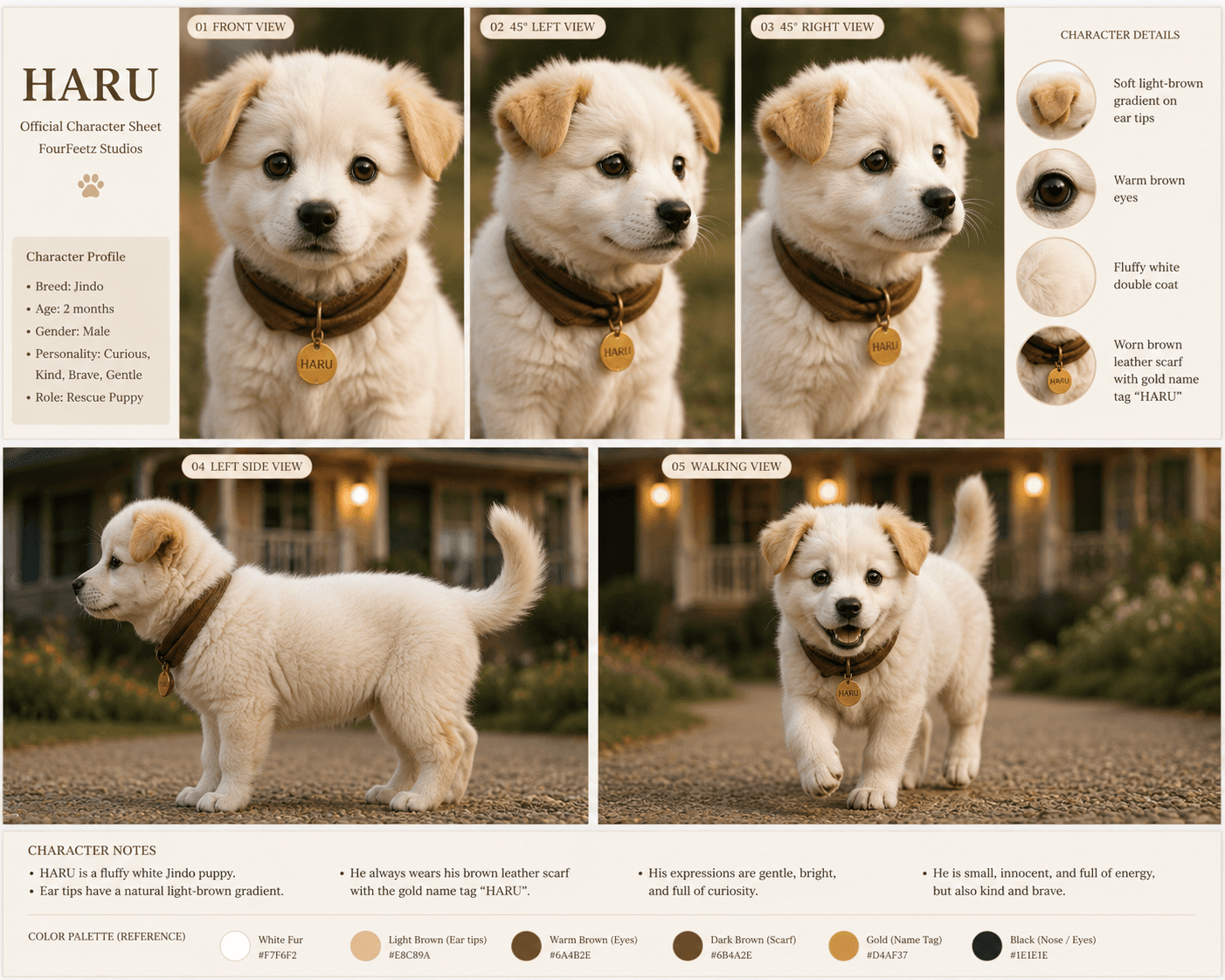
Reference images turn character identity into something visible and repeatable. They help every model understand the same face, body, accessories, and expression range before animation begins.
Front
A front view defines the face, eyes, chest, and main identity details.
Side
A side view helps preserve silhouette, body length, posture, and profile.
Back
A back view protects markings, tail shape, clothing, and rear silhouette.
Close-up
A close-up keeps face shape, eyes, expression, and accessory detail stable.
Full Body
A full-body reference keeps proportions consistent across wide shots.
Expressions
Expression references prevent emotional scenes from changing the character design.
Maintaining Consistency Across AI Models
Different AI tools interpret the same character in different ways. The safest workflow is to keep the reference fixed, simplify prompts, and judge every output against the approved Character Bible.
ChatGPT Image
Strong for planning, visual direction, prompt drafts, and creating structured character references. It still needs approved reference images for consistency.
Runway
Useful for turning approved frames into motion. It works best when the first frame already has the correct character identity.
Kling
Strong for movement and quick video tests. Fast motion can still change face, body, or accessories.
Veo
Strong for cinematic framing and stable atmosphere. Keep references simple and prompts controlled.
Flux
Useful for controlled image variations and character-focused stills when references are clear.
Midjourney
Strong for style exploration and cinematic concepts, but production consistency requires careful curation.
Maintaining Consistency Across Scenes
Scene changes are where character identity often breaks. Lighting, background, camera angle, pose, emotion, and accessories should change only when the story needs them to change.
Lighting
Keep lighting language stable so color, fur, and accessories remain recognizable.
Background
Changing the environment is easier when the character reference remains fixed.
Camera
Use repeatable lens and framing language across connected shots.
Pose
Start with simple poses before asking for complex movement or emotion.
Emotion
Emotional variation should change expression, not the entire face design.
Accessories
Repeat the same accessory details in every shot where the character appears.
The FourFeetz Workflow
FourFeetz treats character consistency as a pipeline. Each approved output becomes a stronger foundation for the next production step.
Common Mistakes
Changing eye color
Even small eye changes can make the character feel unfamiliar.
Changing accessories
Missing collars, tags, scarves, or clothing breaks visual memory.
Different lighting
Random lighting changes can alter fur color, mood, and perceived design.
Different proportions
Changing body size or face shape makes continuity collapse quickly.
Changing camera style
Unstable lens and framing language makes shots feel unrelated.
Too many prompt changes
Rewriting the character every scene invites unnecessary drift.
FourFeetz Recommendations
A consistent AI character is built by removing unnecessary variation. Keep the reference, prompt, lighting, camera style, and core accessories stable unless the story demands a change.
Use one master reference
Start every production from the same approved character sheet or hero image.
Reuse the same prompt
Keep the core character description unchanged across images and videos.
Keep lighting fixed
A stable lighting direction protects color and visual identity.
Keep camera style fixed
Repeat lens, framing, and movement language across connected scenes.
Reuse the last frame
Use the final frame from one approved video as the starting reference for the next scene.
Avoid unnecessary changes
Change only what the story requires. Preserve everything else.
Final Recommendation
Consistency beats randomness. The most professional AI character workflows are not the ones with the longest prompts, but the ones with the clearest references and the fewest unnecessary changes.
For FourFeetz-style character production, the strongest workflow is simple: build a Character Bible, approve reference images, create a hero image, animate carefully, then reuse successful frames to protect identity across the next scene.
FourFeetz Rating
Character Consistency
★★★★★
Ease of Workflow
★★★★☆
Cross-Platform Compatibility
★★★★☆
Video Stability
★★★★☆
Overall
★★★★★
Final Scores
Reference Images
★★★★★
Character Bible
★★★★★
Reuse Last Frame
★★★★★
Consistent Lighting
★★★★★
Prompt Consistency
★★★★☆
Overall
★★★★★
Related Articles
Continue Exploring
Runway Gen-4 Review
A practical review of character consistency, motion quality, and camera control.
Open
Kling vs Veo
A side-by-side comparison of AI video tools for cinematic production.
Open
AI Video Workflow
A repeatable production workflow from planning to publishing.
Open
Writing Better Image-to-Video Prompts
Prompt structure for movement, lighting, environment, and continuity.
Open
Camera Movement Guide
Tracking shots, push-ins, orbits, pans, tilts, and cinematic AI camera movement.
Open
AI Thumbnail Design Guide
Thumbnail composition, color, branding, and AI design workflows.
Open