AI Video
Runway Gen-4 Review
A practical review of character consistency, motion quality, camera control, and production workflow.

Introduction
Runway Gen-4 was tested as part of the HARU production workflow. The goal was not simply to generate visually impressive clips. The real test was whether the tool could preserve an original character, create believable motion, and produce usable shots that could be connected into a longer story.
Runway currently offers newer models and tools, but this article focuses on the practical lessons learned while producing HARU scenes with Gen-4. It is not a claim that Gen-4 is the best model. It is a production note about what worked, what needed control, and where manual planning still mattered.
What Gen-4 Does
Gen-4 Video uses an input image and a text prompt to generate short video clips. In practice, the input image strongly influences composition and character appearance, while the text prompt works best when it focuses mainly on movement, camera behavior, and scene action.
Short controlled prompts often worked better than overloaded prompts. When the image already contained the right composition, pose, lighting, and character details, the prompt could stay focused on what needed to move.
Our Test With HARU
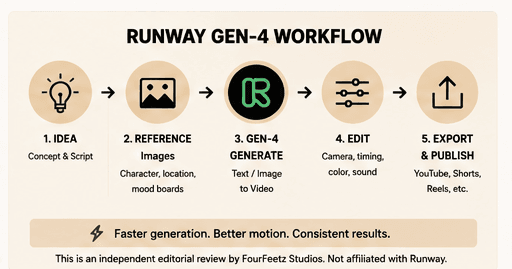
For FourFeetz, the workflow began before Runway. The most important step was creating the exact First Shot Image needed for animation, then using Gen-4 to turn that approved frame into a short cinematic moment.
Workflow checks
- Create the exact First Shot Image before animation
- Keep HARU's appearance fixed
- Avoid direct eye contact with the camera unless intentional
- Define one clear subject movement
- Define one clear camera movement
- Keep lighting and lens language consistent
- Use the final frame of one scene as the visual reference for the next
The full private HARU master prompt, seeds, hidden settings, and internal production templates are not published. The useful public lesson is simpler: continuity came from careful references, narrow motion goals, and scene-to-scene planning.
Character Consistency
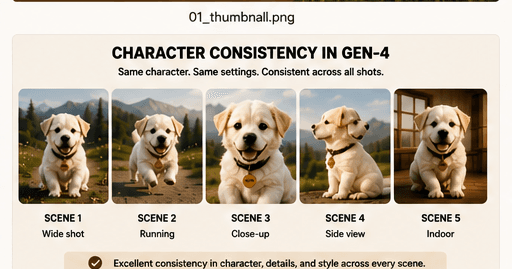
Gen-4 produced the strongest character consistency when the reference image was already accurate. It was useful for preserving HARU's general face, fur color, collar, and scene mood, especially when movement stayed simple and controlled.
Strengths
- Good results when the reference image is already accurate
- Useful for preserving general face, fur color, collar, and scene mood
- Stronger when movement is simple and controlled
Limitations
- Facial proportions may drift
- Accessories may change
- Fast motion can deform paws or body shape
- Complex scenes increase inconsistency
- Longer continuity still requires manual shot planning
Motion Quality
Runway can create natural head turns, walking motion, wind movement, and subtle camera motion when the prompt is focused. The most reliable generations asked for one clear subject action and one clear camera behavior.
It may struggle with precise paw movement, entering or leaving vehicles, interacting with detailed objects, complicated multi-step action, and maintaining anatomy during fast movement.
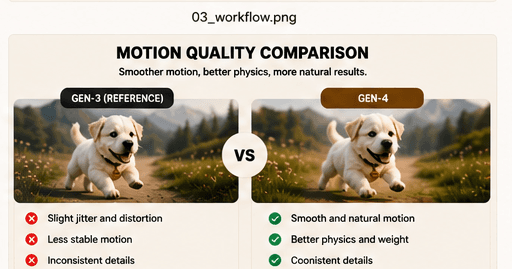
Practical recommendation: generate several short controlled versions instead of asking for one complex shot.
Camera Control
Simple and physically plausible camera language worked best: slow dolly in, gentle tracking shot, fixed camera, shallow depth of field, side profile, over-the-shoulder framing, and golden-hour lighting.
Camera instructions became less reliable when too many moves were combined at once. A short shot with one believable camera behavior was usually easier to edit into a sequence.
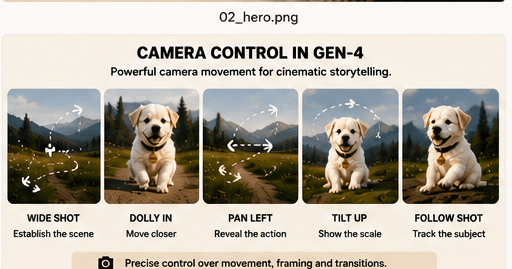
Simplified public example
"HARU turns toward the open window as the camera slowly tracks beside the moving car. Warm golden-hour light, natural fur movement, cinematic 35mm lens."
Workflow Speed
Runway was useful for rapid visual testing and for creating multiple variations from one approved reference image. It helped explore direction quickly, but it did not make AI video production automatic.
The main production time was still spent preparing the reference image, selecting the best generation, maintaining continuity, correcting failed motion, and editing clips together into a coherent sequence.
What Worked Best
Strong First Frames
Start with the exact composition required for the shot.
Simple Motion
Use one main subject action per generation.
Controlled Camera
Avoid combining multiple camera moves.
Short Connected Shots
Build a longer sequence from several approved clips.
What Did Not Work Well
Overloaded Prompts
Too many actions often reduce control.
Fast Complex Movement
Rapid action increases distortion.
Changing Environments
Character identity may drift when too many visual elements change.
Expecting One Perfect Generation
Multiple attempts are usually required.
Verdict
Runway Gen-4 was most useful when treated as one part of a controlled production pipeline rather than as a one-click filmmaking tool.
Its strongest value came from turning carefully prepared reference images into short cinematic moments. For FourFeetz, the quality of the First Shot Image, clear motion direction, and scene-to-scene planning mattered more than prompt length.
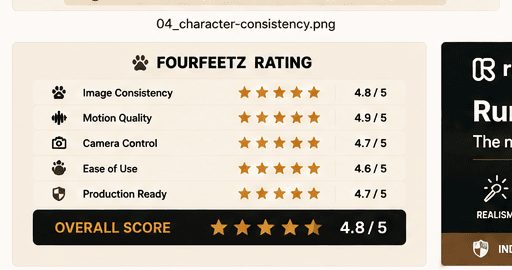
FourFeetz practical production rating
Character consistency
4 / 5
Motion quality
4 / 5
Camera control
4 / 5
Ease of use
4 / 5
Production reliability
3.5 / 5