
Workflow
A Repeatable AI Video Workflow
A complete production workflow for creating cinematic AI videos using reference images, prompts, image-to-video tools, music generation, editing and publishing.
Introduction
AI video production becomes much easier when every project follows a repeatable path. Without a workflow, each shot becomes a new experiment. With a workflow, the team can improve one step at a time: story, references, generation, animation, sound, editing, and publishing.
The goal is not to make the process rigid. The goal is to remove confusion so more creative energy can go into the film itself. A repeatable workflow saves time, improves quality, and makes original characters easier to protect across multiple scenes.
Workflow Overview
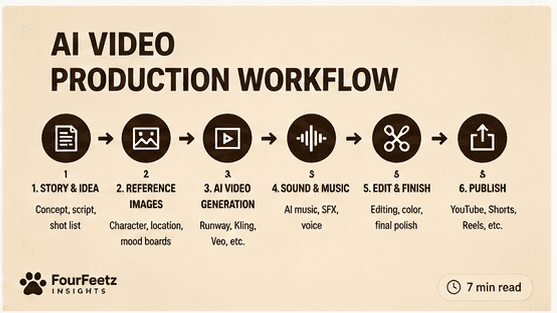
The FourFeetz workflow begins with story and ends with distribution. Each step creates the foundation for the next one, which keeps the production from depending on one lucky generation.
Planning
Planning is the quiet part of AI filmmaking, but it is where most production problems are prevented. Before opening a generation tool, define the story, list the shots, document the character, and collect the mood references.
Story
Define the emotional reason the video exists before choosing a tool.
Shot List
Break the idea into short shots that can be generated, reviewed, and edited.
Character Bible
Lock the character design, personality, colors, and visual rules before production.
Moodboard
Collect lighting, framing, texture, and atmosphere references for the whole piece.
Reference Images
Consistent reference images improve character consistency, camera angle, lighting, and continuity. They give each AI tool a visual anchor so the output is guided by a real frame instead of only a text description.
Image Generation
Image generation creates the visual foundation for animation. The best tool depends on the production need: concept exploration, controlled references, typography-aware graphics, or prompt planning.
ChatGPT
Useful for visual direction, shot planning, prompt drafts, and character documentation.
Midjourney
Strong for polished concept frames, mood references, and cinematic image exploration.
Flux
Useful when the workflow needs controlled image generation and repeatable style tests.
Ideogram
Helpful for graphic layouts, typography-aware concepts, and social-friendly visual assets.
Image to Video
Image-to-video tools transform approved frames into motion. The strongest workflow does not rely on one model for every shot. Runway, Kling, and Veo each serve different production needs.
Runway
Best when the first frame is strong and the shot needs controlled cinematic motion.
Kling
Strong for fast iteration, active movement, and direct prompt-following tests.
Veo
Strong for cinematic camera behavior, stable close-ups, and polished atmosphere.
Music
Music should support the emotional structure of the film. In FourFeetz projects, the soundtrack is developed after the story tone is clear, so the music follows the character instead of overpowering the scene.
Suno
Fast soundtrack sketches, character themes, and emotional music drafts.
Udio
Useful for alternate song structures, mood exploration, and musical variations.
AIVA
Helpful for score-oriented composition and more traditional soundtrack planning.
ElevenLabs Voice
Useful for voice tests, narration, and character voice direction when needed.
Editing
Editing turns separate AI clips into a film. This is where pacing, titles, subtitles, transitions, sound effects, and final color choices create one continuous viewing experience.
CapCut
Fast short-form editing, captions, social exports, and lightweight finishing.
DaVinci Resolve
Color, sound, and timeline control for more polished film-style edits.
Premiere
Flexible editing for longer projects, versioning, and multi-platform exports.
Titles
Keep title design restrained so the AI footage remains the focus.
Subtitles
Use clean captions for accessibility and mobile viewing.
Sound Effects
Add small atmosphere details to make generated shots feel grounded.
Publishing
Publishing is part of the creative workflow, not an afterthought. A single cinematic project can become a main film, a vertical cut, a behind-the-scenes note, a music post, and a resource for other creators.
YouTube
Best for the main film, behind-the-scenes edits, and searchable evergreen work.
YouTube Shorts
Use for vertical cuts, teasers, character moments, and quick workflow clips.
Strong for visual stills, reels, carousels, and character identity building.
TikTok
Useful for fast feedback, short hooks, experiments, and process-driven clips.
Naver Clip
A local distribution path for short vertical video and Korean-language discovery.
FourFeetz Workflow
For FourFeetz Studios, the recommended workflow is simple enough to repeat but flexible enough to improve with each project.
What Works Best
Keep one character reference
Use the same approved character sheet or portrait as the anchor for every scene.
Use one lighting style
A consistent lighting language makes separate shots feel like one world.
Short prompts
One action and one camera instruction are easier to control than a crowded paragraph.
Reuse last frame
Use the final frame from one approved clip as a bridge into the next shot.
Common Mistakes
Changing character every scene
New references in every shot make identity drift harder to control.
Different lighting
Mixed lighting styles make a sequence feel assembled instead of directed.
Too many actions
Complex prompts often create confusing motion and weaker continuity.
Long prompts
Longer text does not automatically create better direction or better animation.
Final Recommendation
The best AI video workflow is not built around one magic tool. It is built around repeatable decisions: clear story, stable references, short prompts, controlled motion, careful editing, and platform-aware publishing.
For creators building original characters or recurring worlds, the workflow matters as much as the model. The more repeatable the process becomes, the more consistent the creative universe can feel.
FourFeetz Verdict
Workflow Simplicity
4.6/5
Production Speed
4.5/5
Character Consistency
4.4/5
Scalability
4.7/5
Content Quality
4.6/5
Overall
4.6/5
Related Articles
Continue Exploring
Runway Gen-4 Review
A practical review of character consistency, motion quality, and camera control.
Open
Kling vs Veo
A side-by-side comparison of AI video tools for cinematic production.
Open
Writing Better Image-to-Video Prompts
Prompt structure for movement, lighting, environment, and continuity.
Open
Camera Movement Guide
A guide to tracking shots, push-ins, orbits, pans, tilts, and cinematic AI camera movement.
Open